
Technical requirements for events
1 min read
One page to send to the venue's IT and sound crew before the event. Everything Saydi needs from them, with the numbers.
The computer that runs Saydi
| Requirement | |
|---|---|
| Computer | Any laptop from the last ~5 years. Windows or Mac. Plugged into power. |
| Browser | Chrome, Edge or Cốc Cốc, up to date. Sign in to saydi.ai before the day. |
| Sleep and updates | Turn off sleep, screen lock and automatic updates for the day. |
| Audio in | A USB audio interface or the mixer's USB output. See below. |
| Video out | HDMI to the projector or LED processor, if subtitles go on the big screen. |
| Backup | A second laptop signed in to the same account, ready to take over. |
Audio: from the mixer to the laptop
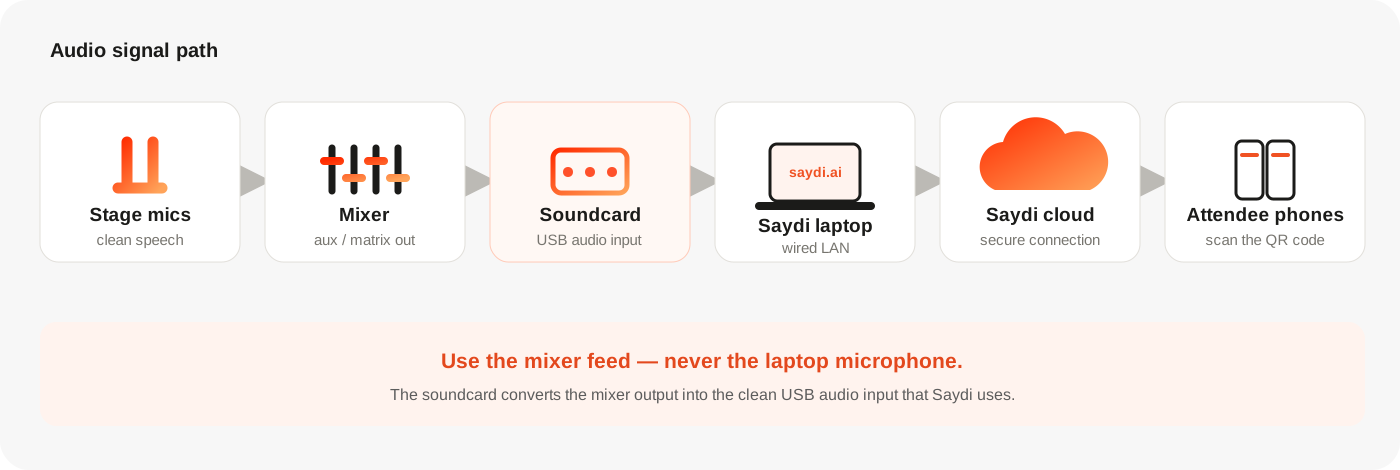
Saydi needs the stage microphones' signal, clean, without room echo. Take it from the mixer, never from a microphone placed in the room.
| Mixer output | Cable | Into the laptop via |
|---|---|---|
| USB (digital mixers) | USB cable | Directly. Choose the mixer as the input device in Saydi. |
| XLR (aux / matrix send) | XLR | A USB audio interface (e.g. a 2-channel interface). |
| 3.5 mm / RCA (aux out) | 3.5 mm or RCA-to-3.5 mm | The laptop's line-in, or a USB interface. |
- Send a post-fader mix of the stage microphones only: no music, no video playback unless the video's speech should be translated too.
- Mono is fine. Saydi processes speech at 16 kHz; higher sample rates don't help.
- Keep the level healthy: peaks around −12 dBFS on the interface, no clipping.
- Label the cable SAYDI so it doesn't get repatched during the day.
Network
| Requirement | |
|---|---|
| Saydi laptop | Wired LAN. ≥ 2 Mbps up and down, dedicated. Ping to Singapore < 100 ms. Packet loss < 1 %. |
| Ports | 443/TCP outbound only (WebSocket over HTTPS). No inbound ports, no VPN. Guest networks with a captive portal are fine once accepted. |
| Domains to allow | saydi.ai, api.saydi.ai and their subdomains. |
| Attendee Wi-Fi | ~0.2 Mbps per phone. 100 people ≈ 30 Mbps, 300 ≈ 85, 500 ≈ 140 (40 % headroom included). One access point per 50–75 devices, 5 GHz preferred. |
| Backup | A 4G/5G router or phone hotspot for the Saydi laptop. Tell attendees they can use mobile data. |
Display, if subtitles go on the big screen
- Saydi's Full screen view: dark background, 2 columns (original and translation). Text size adjustable 1–10 in the Display panel.
- For a lower third inside a video mix, use OBS or vMix with a browser source. Steps in Stage tech.
- LED walls with unusual resolutions: set the laptop to extend the display and match the processor's resolution.
What to expect
- Subtitles appear about 1–3 seconds after the words are spoken.
- Saydi detects the language spoken on stage. Speakers can switch languages; nobody presses anything.
- Names, product names and industry terms should be loaded into AI Context 7–10 days before. It's the biggest accuracy lever.
Sound check, 60 minutes before doors
- Laptop on wired LAN, signed in, event open on the Host page.
- Speak into each stage mic. The sound bars in Saydi move; text appears.
- Open the attendee link on 2 phones: one on venue Wi-Fi, one on mobile data. Subtitles show on both.
- If the big screen is used: text readable from the last row.
- Agree who to call if something breaks, and where the backup laptop is.